
3.5 Generating Blog Post Topics

Photo by Tiffany Davidson; Taken near Sedona, Arizona
A content marketing strategy is imperative to growing your Google ranking.
For good SEO, blogging is not optional.
Different people have very different reactions to this statement. Some become frustrated and start looking for ways around the fact, while others simply say “Ok. I’ll make it happen. Let me know what I need to do!” (I’ll let you guess my favorite type of client!).
To grow your traffic and rankings, you must blog.
By blog I don’t mean writing about any ol’ topic, I’m talking about a blogging strategy— creating content based around keywords that your target audience will be looking for on Google.
Sometimes called content marketing, this form of blogging anticipates what your target audience(s) will be typing into Google, and then preemptively responds to those keyword searches with a high-quality blog post. This blog post is your chance to impress the reader so that they become interested in you / your business / services / products / etc.
We’ll be using the keyword research we’ve done already in this course to guide us as we generate blog post topics.
With any new website or SEO project, I always generate at least eight blog post topics for clients. Ideally, these posts should all be created and published within 1-2 months after launching a new site or performing an SEO service. But quality matters more than quantity.
When generating blog post topics for clients, I include two key parts: title and URL to be used for each post. They can craft the content of the post however they like, but the title and URL I provide them do not need to change, as it’s based on the keyword research.
To reiterate, the purpose of these SEO-driven blog posts is to position yourself in front of your target audience, basically creating a response to the search terms they’ll be using. If you do this right—and you will because I’m going to show you how—you can get your site to Google Page 1 for several different keywords, and your target audience will indeed find you.
So now it’s time to show you how I go about generating blog post topics for a website, so you can do the same for your site or your clients.
Each keyword is an opportunity for a blog post.
Using keyword research to generate blog post topics
Before we start generating blog post topics, first it’s important that you understand the following SEO secrets I’ve discovered over the years:
Search engines place ranking significance on blog post title and URL
Therefore, your title and URL of each blog post need to contain the keyword you’re targeting for that particular post
So when you’re analyzing a certain keyword in order to craft a blog post from it, begin by brainstorming creative ways you can include that keyword in the title of the blog post.
brainstorming ideas on your own
For example, one of the keywords for my “Monterey wedding photography” website is big sur destination wedding. I need to think about how I can craft a blog post title that both:
includes the keyword (big sur destination wedding) in the title
and doesn’t sound robotic
Creating the URL of the post is simple- we just use the keyword itself, for example: www.sitename.com/blog/big-sur-destination-wedding.
the URL is moreso for robots, while the title is written for humans (though the google robots read both).
So while our URL can be very straightforward, we need to wordsmith a bit for our human readers.
When brainstorming a good blog post title for the keyword big sur destination wedding, I need to think about what information the person searching for that keyword would benefit from. How can I provide value to someone searching for this keyword?
Here are ideas that come to mind right away:
“Planning Your Big Sur Destination Wedding”
URL: /big-sur-destination-wedding“11 Ways To Make Your Big Sur Destination Wedding Dreams A Reality”
URL: /big-sur-destination-wedding
Make sure NOT to target keywords that are too similar—wherein you would essentially be competing against yourself in Google rankings—but rather to create ONE in-depth article to target the keyword.
Using the example above, I would now take the two blog post titles and their URLs and merge it into one blog post, perhaps titling it something like “Planning Your Big Sur Destination Wedding: Every Single Thing to Know and Consider” and I would probably use the URL /big-sur-california-destination-wedding so that California gets thrown in there for anyone using that slight variation in their search.
Quality over quantity
Be sure you are writing very comprehensive and thorough blog posts to target specific keywords. These are the posts that will rank well on Google, not a quickly thrown together blog post just for the sake of “getting another one out there.”
ChatGPT is an incredibly useful tool and, when it comes to content development, you can get a lot of value using the free version alone. I really recommend getting comfortable with this tool.
analyzing keyword results in google
At this point, I would move on to another keyword because I feel my “big sur destination wedding” audience has been sufficiently addressed.
But, let’s assume you weren’t able to come up with any ideas of blog post titles on your own.
In that case, you would want to head over to Google and analyze the keyword there, letting the Page 1 results hopefully spark ideas of your own.
To do this:
Enter the keyword in question into Google’s search bar and hit Enter.
Browse the Google Page 1 results. No need to click-through to any of them, just pay attention to titles and see if you can get any ideas of your own.
If Page 1 doesn’t spark any ideas, you might need to analyze Page 2 results as well.
step 3: pay attention to questions being asked and use those for blog post ideas
After you’ve analyzed the Google Page 1 title results for ideas, take a look at the “People also ask” section on Google Page 1. This is often another great way to glean ideas for blog post topics!
In our current example, using the keyword big sur destination wedding, we see three popular questions that people are asking:
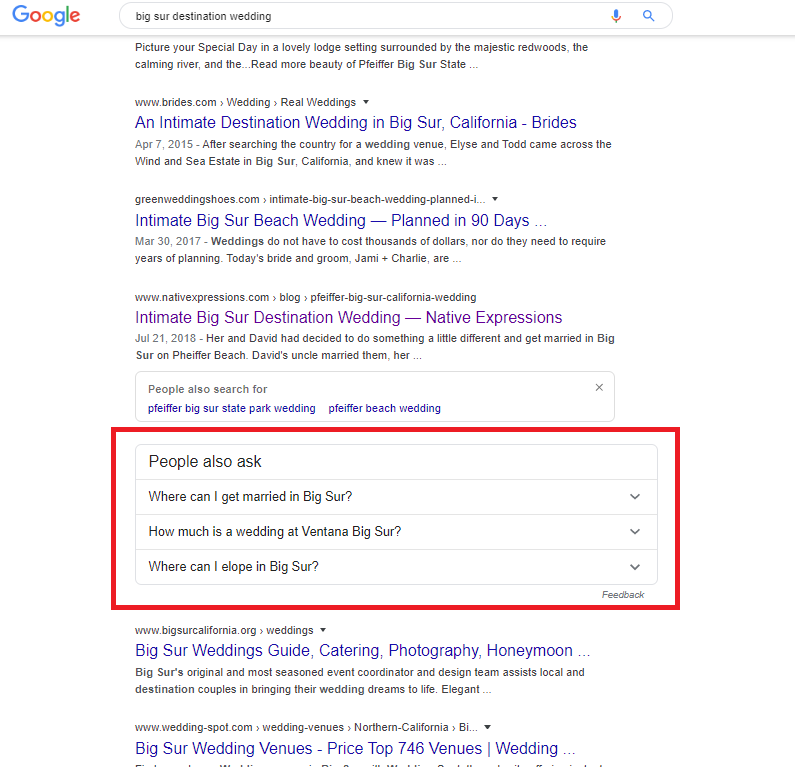
You can create a blog post that responds to those questions, such as “Big Sur Elopement Guide” using the URL /big-sur-elopement which is a variation of one of our keywords. I’m going to add this to our list of blog post topics.
Let The “People Also Ask” list inform your blog post structure
The other way you can use “People Also Ask” is to feature the questions as headers in a blog post. For example, in the blog post topic we generated earlier —“Planning Your Big Sur Destination Wedding”— you could have a section in your post entitled “The Best Places To Get Married In Big Sur” which responds to the first question: Where can I get married in Big Sur?
Another section within your post could be entitled “How Much Does A Big Sur Wedding Cost?” and you could go into detail about the different costs of the venues themselves as well as other related costs to anticipate for the entire event.
Header fonts do hold importance for SEO rankings, so I would suggest including your keywords or these “People also ask” questions in an H3 or H2 font within your blog post. (That said, I do see people fixating too much on this sometimes, and there are other more important factors for SEO, such as the title and URL as I’ve highlighted in this lesson.)
By responding to the people also ask questions in your blog post and making it as comprehensive as possible, taking your time to craft each post, your articles will rank better than a shorter, more quickly thrown together post using that very same keyword and title.
Rinse & Repeat to continue generating blog post ideas
Now that you have an understanding of the process of generating SEO-driven blog post topics for your Squarespace site, simply repeat this process with other keywords.
The goal is to create a list of blog post topics that includes a variety of all your different keywords to ensure your site is getting found by all possible target audiences.

Welcome to Squarespace SEO Expert! In this course I'm going to teach you the exact process I use to rank Squarespace websites on Google Page 1, using no paid advertising, only organic SEO techniques. If at any point you have questions, please use the comment feature at the bottom of the particular lesson you have a question about. I'm happy to help!

-
1. Introduction
- Mar 2, 2020 1.1 Welcome!
- Feb 3, 2020 1.2 What Is SEO? Why Is It Important?
-
2. Anwering Questions
- Jan 3, 2020 2.1 Necessary Initial Questions
-
3. Keyword Research
- Dec 3, 2019 3.1 Discover What Your Target Audience Is Searching For
- Nov 3, 2019 3.2 Using Suggested Keywords
- Oct 3, 2019 3.3 Keyword Planner Tool
- Sep 3, 2019 3.4 High-Intent Keywords
- Aug 3, 2019 3.5 Generating Blog Post Topics
- Jul 3, 2019 3.6 Site Meta Title & Description
-
4. Applying On-Site SEO
- Jun 3, 2019 4.1 SEO Title and Description Fields
- May 3, 2019 4.2 Optimizing Image Files Before & After Uploading
- Apr 3, 2019 4.3 On-Page SEO
- Mar 3, 2019 4.4 Understanding The Sitemap
- Feb 3, 2019 4.5 Blogging For SEO
-
5. Moving Forward
- Jan 3, 2019 5.1 Using Google Search Console
- Dec 3, 2018 5.2 Consistent SEO Blogging
- Nov 3, 2018 5.3 Adding New Content
- Oct 3, 2018 5.4 Epilogue
Copyright
© 2020-2024, All Rights Reserved
All content in this course is created and owned by me and cannot be used or sold elsewhere. Thank you for appreciating and valuing my work and experience.