
4.2 Optimizing Image Files Before & After Uploading

Photo by Tiffany Davidson: Mt. Shuksan in Washington State
Image files are very convenient for adding on-site SEO and should always be optimized.
Image files are one of the primary ways to inject your target keywords into the sitemap, thereby enhancing your site SEO.
The wonderful thing about images is that you can speak directly to the search engine robots, using their very straightforward language, as opposed to having to wordsmith your keywords to make them palatable for humans.
Right after keyword research, before the design phase of a site begins, you should gather all image files that you plan to use for the site, and optimize them.
What do I mean by optimize image files?
Two main things to do before uploading images to your site:
Resize - images used for banners/full-width display should be no more than 2500px on the longest side, and images to be used throughout the site (not as full-width) should be resized to no more than 1500px on the longest side.
Rename - change the filenames of all images to contain your site title and/or at least one other keyword. For example: California Clicks, Monterey Wedding Photography.jpg or Carmel Wedding Photographer.png
We will be optimizing filenames on-site later as well, but some image files on Squarespace, such as banners or galleries, do not allow you to adjust the filename. Therefore, we want to be sure our keywords are packed into each image before uploading to the site in case we can’t optimize the filename on-site.
Otherwise, if you uploaded an image to your site with a random filename such as white-couch123.jpg as a banner image, gallery image, blog thumbnail, etc. then you have no way to change the filename on-site, so this white-couch123.jpg filename would be stored in the sitemap.
We don’t want that- we want only our target keywords to be stored in the sitemap!
When you optimize filenames before uploading to your site, you ensure that your keywords are added to your sitemap, not random filenames which could confuse search engine robots and cause them not to rank your site as well.
Optimizing image files on-site, after uploading:
Now it’s time to learn the different techniques for optimizing image files on-site.
As you probably know, there are several different ways you can upload photos to your Squarespace site: banner images, individual image blocks, galleries, and more.
So we need to know how to optimize each type of image upload.
Explaining this in text would probably give you a headache; a video instructional* is definitely the best way to illustrate these techniques, so here you go:
*Please note:
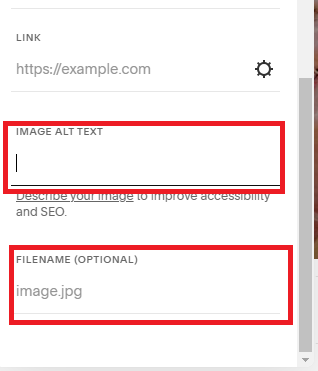
In version 7.1, captions are no longer offered with image blocks except for within blog posts. With these new updates, I recommend placing keywords in the filename of image blocks and you can place keywords in the ALT TEXT file after the description of the image, for example: women in pink dress riding bicycle - <keywords>.

Welcome to Squarespace SEO Expert! In this course I'm going to teach you the exact process I use to rank Squarespace websites on Google Page 1, using no paid advertising, only organic SEO techniques. If at any point you have questions, please use the comment feature at the bottom of the particular lesson you have a question about. I'm happy to help!

-
1. Introduction
- Mar 2, 2020 1.1 Welcome!
- Feb 3, 2020 1.2 What Is SEO? Why Is It Important?
-
2. Anwering Questions
- Jan 3, 2020 2.1 Necessary Initial Questions
-
3. Keyword Research
- Dec 3, 2019 3.1 Discover What Your Target Audience Is Searching For
- Nov 3, 2019 3.2 Using Suggested Keywords
- Oct 3, 2019 3.3 Keyword Planner Tool
- Sep 3, 2019 3.4 High-Intent Keywords
- Aug 3, 2019 3.5 Generating Blog Post Topics
- Jul 3, 2019 3.6 Site Meta Title & Description
-
4. Applying On-Site SEO
- Jun 3, 2019 4.1 SEO Title and Description Fields
- May 3, 2019 4.2 Optimizing Image Files Before & After Uploading
- Apr 3, 2019 4.3 On-Page SEO
- Mar 3, 2019 4.4 Understanding The Sitemap
- Feb 3, 2019 4.5 Blogging For SEO
-
5. Moving Forward
- Jan 3, 2019 5.1 Using Google Search Console
- Dec 3, 2018 5.2 Consistent SEO Blogging
- Nov 3, 2018 5.3 Adding New Content
- Oct 3, 2018 5.4 Epilogue
Copyright
© 2020-2024, All Rights Reserved
All content in this course is created and owned by me and cannot be used or sold elsewhere. Thank you for appreciating and valuing my work and experience.