
3.2 Using Suggested Keywords

Photo by Tiffany Davidson; Taken at Fort Flagler park on Marrowstone Island, Washington
Google will actually help you along in this process of keyword discovery. You just have to know how to follow the trail of bread crumbs!
Now that we’ve created a list of primary keywords to begin our research, it’s time to head over to Google and learn how to use Google’s built-in features to generate even more keywords.
At this point, I recommend starting a document so that you have a concise place to store all of your keywords. For this, I use Google Docs, and I create the following sections on the doc:
Keyword Research
Blog post topics (or power page ideas)
Moving forward - how to maintain and grow SEO (I only fill this section out when working on a clients website)
Throughout this course, we’ll be filling in these categories, and as we build out this document, we’ll end up with a very helpful “SEO document” moving forward that we will need to reference often.
So let’s begin our investigation into the best keywords for our site.
Using Google Suggest
When you begin to type a keyword (any search) into Google’s search bar, Google will try to guess what you are wanting to look for based on popular keywords. This will show up as a drop-down list underneath the search bar, also known as autocomplete.
Using one of our examples from the previous lesson, notice how Google suggests keywords for “wedding photography monterey” as a drop-down list that autocompletes and adjusts as you type.
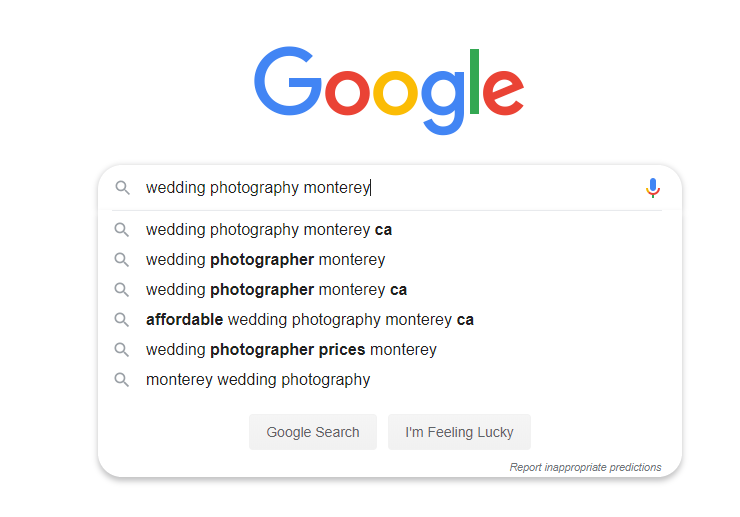
It’s important to stop right here, before hitting Enter to initiate your search, and to first take note of these keywords.
When Google autocompletes and suggests keywords like this, they are essentially telling you: “Hey, these are popular related keywords that people search for!” So it’s to our benefit to record them. Not only can you use these as keywords for your site, but you can also use them to generate blog post topics later.
In this example, I would head over to my SEO document and record any of these keywords that apply to your business or target audience under the “Keyword Research:” section.
For example, if you want to market yourself as a very high-end wedding photographer, you might decide to leave out “affordable wedding photography monterey ca” as a keyword for your site because you might attract a clientele that you’re not aligned with from a budget angle.
Tip: You can also use this technique on Pinterest, Youtube, & other search engines to discover popular keywords.
Once you add these keywords to your list, be sure to come back to Google with each one and rinse and repeat this whole process. This will allow you to get more and more specific about the keywords that your target audience are searching for on Google.
Variations of suggested keywords
Another important approach is to try rearranging the words within the keyword phrase to imagine how some people might enter their search. For example, we’ve been using the term “wedding photography monterey” but some people might type in “monterey ca photographer” so you want to also test that and see if any suggested keywords apply to your website. So let me test this and show you what I mean…
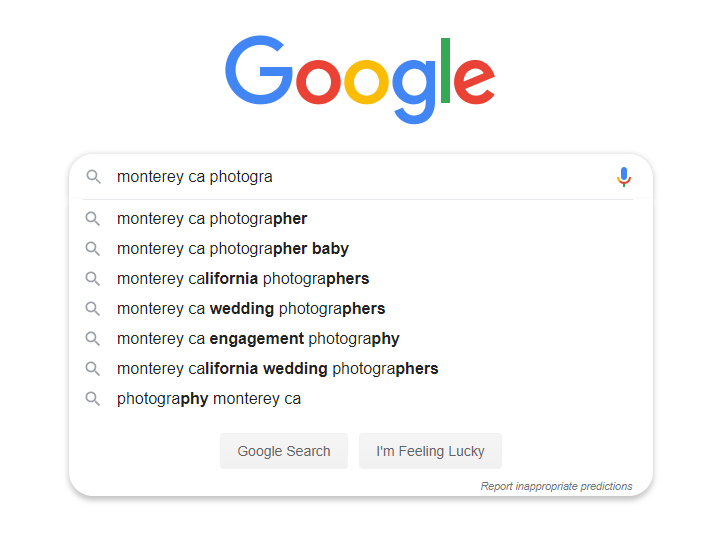
See how a couple of new keywords emerged here that might be applicable to our hypothetical site? As a wedding photographer in Monterey, I would add the following keywords from above to my list: monterey ca wedding photographers, monterey ca engagement photography, and monterey california wedding photographers.
It’s essentially just a rearranging of keywords, but I like to make sure I pinpoint all keyword variations verbatim when I’m optimizing a site. Later, when selecting a primary keyword for a specific page on your site, you can include secondary keywords that are very similar. For example, if my target keyword for a page is squarespace web designer, I might also target the keyword squarespace website designer on that same page as a secondary keyword.
Consider geography
If your website is targeting an audience in a specific geographical region, this is also a very important factor for SEO.
To keep with our example of a wedding photographer in Monterey, let’s imagine that we’re willing to travel to nearby locales. Big Sur is a popular wedding destination near Monterey, so let’s test it with Google Suggest:
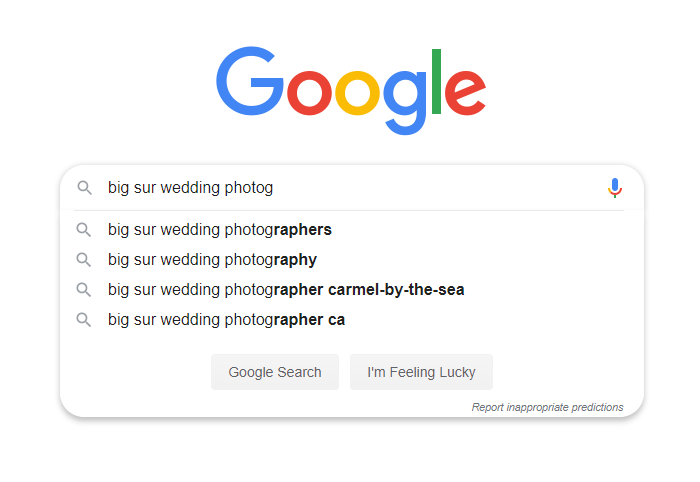
Not only do we get two new keywords to add to our list — big sur wedding photographers and big sur wedding photography — but we also get a new trail of bread crumbs to follow: Carmel!
Carmel is a nearby location and is obviously a popular search otherwise Google wouldn’t have included it.
So, let’s follow that trail and see what we come up with:
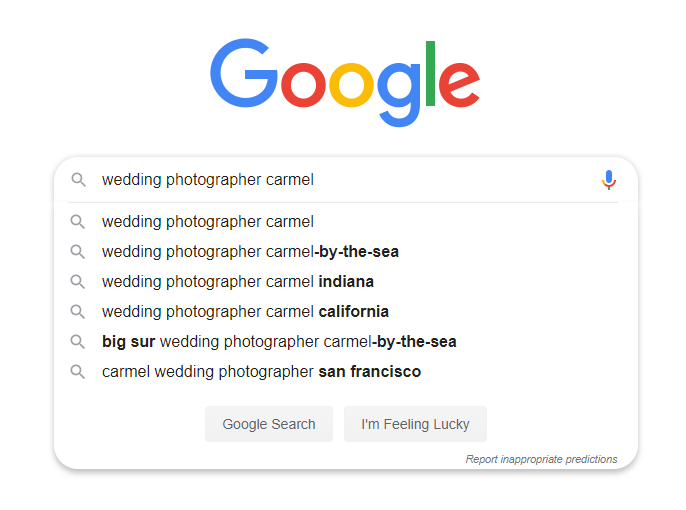
Right away, we have four new keywords to add to our list: wedding photographer carmel, wedding photographer carmel-by-the-sea, wedding photographer carmel california, and big sur wedding photographer carmel-by-the-sea.
It would be up to you as the hypothetical Monterey wedding photographer whether or not you want to branch out into San Francisco or not. If you decide you do want to offer your services in San Francisco as well, then you would just start down that trail of research using all of the above mentioned techniques.
Keyword research is an investigative process- we become Google detectives.
Related searches
One last thing you want to make sure to pay attention to while you’re in this phase of keyword investigation is Google’s related searches.
Once you search for a keyword, scroll down to the bottom of the search results and you will see a list of related keywords.
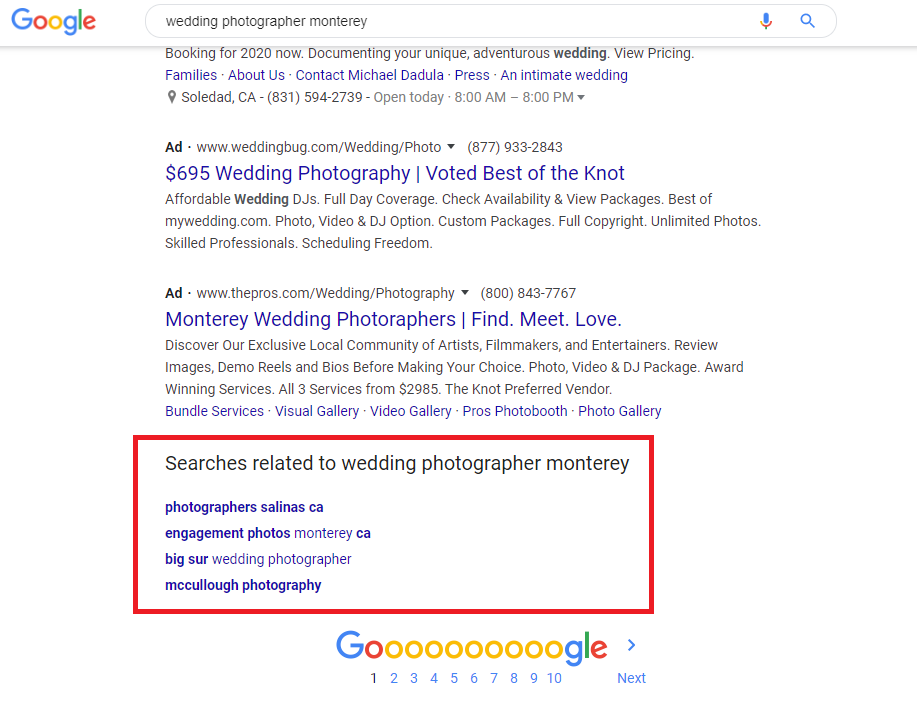
Here again is an opportunity to add new keywords to your list if they apply to your goals. For example, perhaps the above related search results would cause you to consider including a new location (Salinas CA) in your research and perhaps even branching out beyond wedding photos and also including “engagement photos” in your keyword research process.
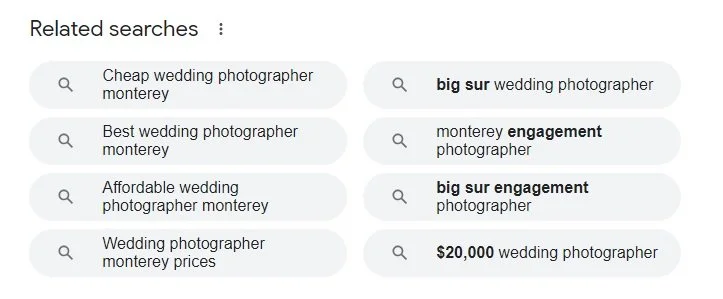
UPDATE: As of January 2024, Google is now presenting related keywords in the following format:
Video Demonstration
Now that you have a better understanding of how to research and collect pertinent keywords for your site, here is a screenshare video to show you this process as I’m doing it, which should help round out your understanding even more:

Welcome to Squarespace SEO Expert! In this course I'm going to teach you the exact process I use to rank Squarespace websites on Google Page 1, using no paid advertising, only organic SEO techniques. If at any point you have questions, please use the comment feature at the bottom of the particular lesson you have a question about. I'm happy to help!

-
1. Introduction
- Mar 2, 2020 1.1 Welcome!
- Feb 3, 2020 1.2 What Is SEO? Why Is It Important?
-
2. Anwering Questions
- Jan 3, 2020 2.1 Necessary Initial Questions
-
3. Keyword Research
- Dec 3, 2019 3.1 Discover What Your Target Audience Is Searching For
- Nov 3, 2019 3.2 Using Suggested Keywords
- Oct 3, 2019 3.3 Keyword Planner Tool
- Sep 3, 2019 3.4 High-Intent Keywords
- Aug 3, 2019 3.5 Generating Blog Post Topics
- Jul 3, 2019 3.6 Site Meta Title & Description
-
4. Applying On-Site SEO
- Jun 3, 2019 4.1 SEO Title and Description Fields
- May 3, 2019 4.2 Optimizing Image Files Before & After Uploading
- Apr 3, 2019 4.3 On-Page SEO
- Mar 3, 2019 4.4 Understanding The Sitemap
- Feb 3, 2019 4.5 Blogging For SEO
-
5. Moving Forward
- Jan 3, 2019 5.1 Using Google Search Console
- Dec 3, 2018 5.2 Consistent SEO Blogging
- Nov 3, 2018 5.3 Adding New Content
- Oct 3, 2018 5.4 Epilogue
Copyright
© 2020-2024, All Rights Reserved
All content in this course is created and owned by me and cannot be used or sold elsewhere. Thank you for appreciating and valuing my work and experience.